Computer vision is what separates a flying camera from a drone that understands what it sees — the person to follow, the crack in the weld, the row of crops that's stressed. It's the most common form of AI on drones, and this guide covers how it actually works onboard, where it runs, and why it's harder than pointing a webcam at the ground.
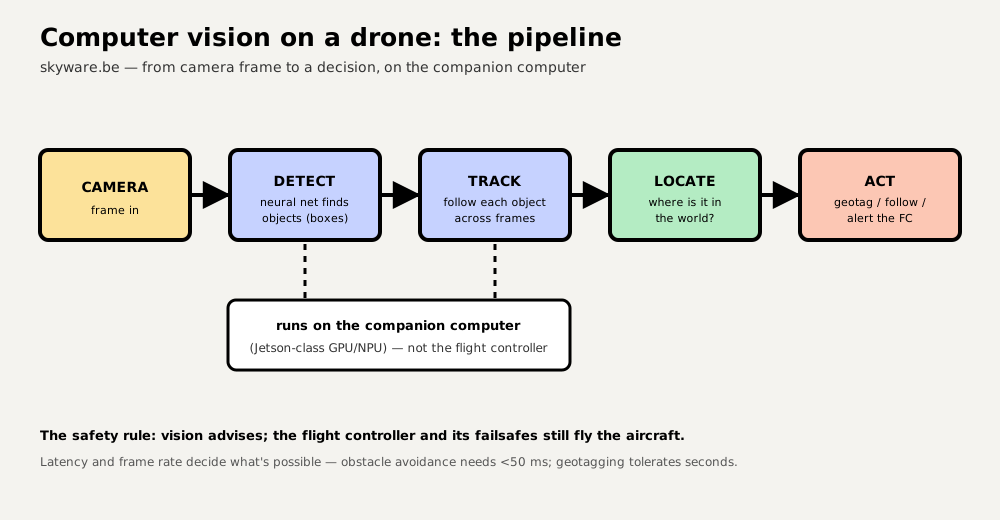
The pipeline: detect → track → locate → act
- Detect. A neural network scans each frame and draws boxes around objects it recognises — the job of YOLO-class models. Detection alone is per-frame and has no memory.
- Track. A tracker links detections across frames so "person #3" stays the same person as it moves — essential for following a subject or counting things once.
- Locate. Combine the pixel position with the drone's attitude, altitude and position to work out where in the world the object is — for geotagging or for the aircraft to fly toward it.
- Act. Do something: tag it on a map, follow it, or hand a bounded command to the flight controller.
The two hard problems
- Small objects, busy background. A target at range is a handful of pixels against a huge, moving scene of ground, sky and clutter. This is small-object detection, one of the harder problems in vision, and it's why generic models (trained on close-up everyday photos) disappoint — drone vision needs models trained on aerial, small-object data. Your dataset, not the model architecture, is usually the deciding factor.
- Latency and compute budget. The model runs on a power- and weight-limited companion computer, and the frame rate it achieves decides what's possible: obstacle avoidance needs <50 ms, subject tracking under ~150 ms, while geotagging can take seconds. Export models to an optimised runtime (TensorRT/ONNX) to claw back speed.
Where it runs — and the safety line
Real-time vision runs onboard (a cloud round trip is far too slow over a cellular link); heavy post-analysis runs on a server after landing. And the golden rule from AI drone integration holds: vision advises, the flight controller decides. The model proposes bounded commands (fly toward this, point the gimbal there); the flight controller and its failsafes keep the aircraft safe, and the mission stays flyable if the vision process dies mid-flight.
The tools you'll actually use
- OpenCV — the workhorse library for image handling, classical vision and trackers.
- YOLO (Ultralytics) — the fastest route from a dataset to a deployable detector.
- An optimised runtime (TensorRT on Jetson, ONNX Runtime, OpenVINO) — typically 2–5× the throughput of running the training framework directly.
The model is the easy, commoditised part — anyone can download the same architecture. What competitors can't copy is your labelled dataset of real flights: the edge cases, the odd angles, the lighting your customers actually operate in. Teams that ship treat data collection and labelling as the core investment, not an afterthought — the same point the AI integration guide makes, and it's doubly true for vision.
Vision as a sensor for autonomy
Detection and tracking are also the eyes of a self-flying drone: the same pipeline feeds obstacle avoidance and GPS-denied navigation, where cameras estimate the drone's own motion when satellites aren't available. Perception is where AI on drones starts — autonomy is where it goes next.
Frequently asked questions
What is computer vision used for on drones?
Spotting and following things: detecting objects (people, vehicles, defects, crops), tracking a subject to follow or film it, reading the scene for navigation and obstacle avoidance, and inspecting infrastructure automatically. It's what turns a flying camera into a drone that understands what it's looking at.
Does computer vision run on the drone or in the cloud?
Anything that must react in real time — tracking, avoidance, live alerts — runs onboard on a companion computer, because a cloud round trip is far too slow. Heavy analysis of the footage, like building detailed maps or reports, is usually done afterwards on a server. Most systems do both.
Why is detecting objects from a drone hard?
Because targets are often tiny (a few pixels), the background is cluttered and constantly moving, lighting and angles change, and the compute and power budgets are tight. Off-the-shelf models trained on everyday photos underperform; drone vision needs models trained on aerial, small-object data.